How to Automate Sales Pipeline Review Meetings

Alex Zlotko
CEO at Forecastio


Sales pipeline review meetings can be automated by replacing manual CRM reviews with automated data analysis, AI-generated insights, and workflow automation. Instead of checking every opportunity one by one, sales managers receive a prioritized list of key deals, identified risks, deal summaries, recommended next steps, and follow-up tasks before the pipeline review meeting starts. This reduces preparation time, makes pipeline CRM reviews more consistent, and helps sales teams focus on coaching and moving deals forward instead of collecting information.
There are several ways to automate a sales pipeline review. You can automatically identify stalled deals and deals with unrealistic expected close dates, prioritize opportunities that need discussion, generate deal summaries, measure pipeline coverage ratio and overall pipeline health, create follow-up tasks, and even recommend actions that improve forecast accuracy and sales performance. In the following sections, we'll explain each approach and show how to build an effective pipeline review automation process.
What Is a Sales Pipeline Review Meeting?
A sales pipeline review meeting is a structured meeting where sales managers and the sales team review active opportunities to identify risks, validate deal strategies, and decide what needs to happen next to move deals forward. It is one of the core activities of effective sales pipeline management. Unlike a forecast meeting, which focuses on revenue projections, a pipeline review focuses on the quality of the sales pipeline, individual opportunities, and the actions required to increase the chances of winning deals.
Example of an Effective Sales Pipeline Review Structure
An effective sales pipeline review should follow a consistent structure so that every pipeline review meeting focuses on the opportunities that matter most. Instead of reviewing every deal in the CRM, sales managers should evaluate pipeline quality, identify risks, and agree on actions that help the sales team move deals forward.
The following example shows a simple sales pipeline review structure that can be used during weekly or bi-weekly pipeline reviews.
Review Focus | What should be reviewed |
|---|---|
Validate deal quality | Is the opportunity progressing through the buying process? Are there any warning signs? |
Identify risks | Find every stalled deal, unrealistic expected close date, inactive opportunity, or missing next step. |
Prioritize key deals | Decide which key deals require coaching or executive involvement. |
Improve pipeline quality | Remove weak opportunities, update CRM data, and improve overall pipeline health. |
Prepare accurate forecasts | Ensure the pipeline reflects reality and supports better sales forecast accuracy. |
Not every opportunity requires discussion. In most cases, only a small percentage of deals need management attention. The purpose of a pipeline review is to identify those opportunities quickly, understand what is preventing them from progressing, and agree on the next actions.
Once this structure is established, the next step is to automate as much of the review as possible. Many of these activities, such as identifying risky deals, prioritizing opportunities, reviewing CRM data, and preparing recommendations, can be completed automatically before the meeting starts. This allows sales leaders to spend less time gathering information and more time coaching their teams and making better decisions.
How to Automate Sales Pipeline Review Meetings
Running effective sales pipeline review meetings involves much more than discussing deals with your sales team. Before every meeting, sales managers need to decide which opportunities should be reviewed, analyze each deal, evaluate overall sales pipeline health, prepare discussion points, and assign follow-up actions. Much of this work is repetitive and can consume several hours every week.
Fortunately, many of these activities can be automated. Depending on your requirements, you can use built-in CRM capabilities such as dashboards, filters, reports, and workflows, or adopt specialized revenue intelligence software and AI agents for revenue operations. The right combination allows you to prepare reviews faster, identify more issues, improve forecast accuracy, and spend more time coaching your team instead of collecting information.
The goal is not simply to automate a weekly meeting. Modern revenue teams use automation to monitor their pipeline continuously. Instead of waiting until the next review, managers receive alerts about stalled deals, slipping close dates, declining engagement, or other risks as soon as they appear, allowing them to intervene earlier.
Automate Deal Selection and Prioritization
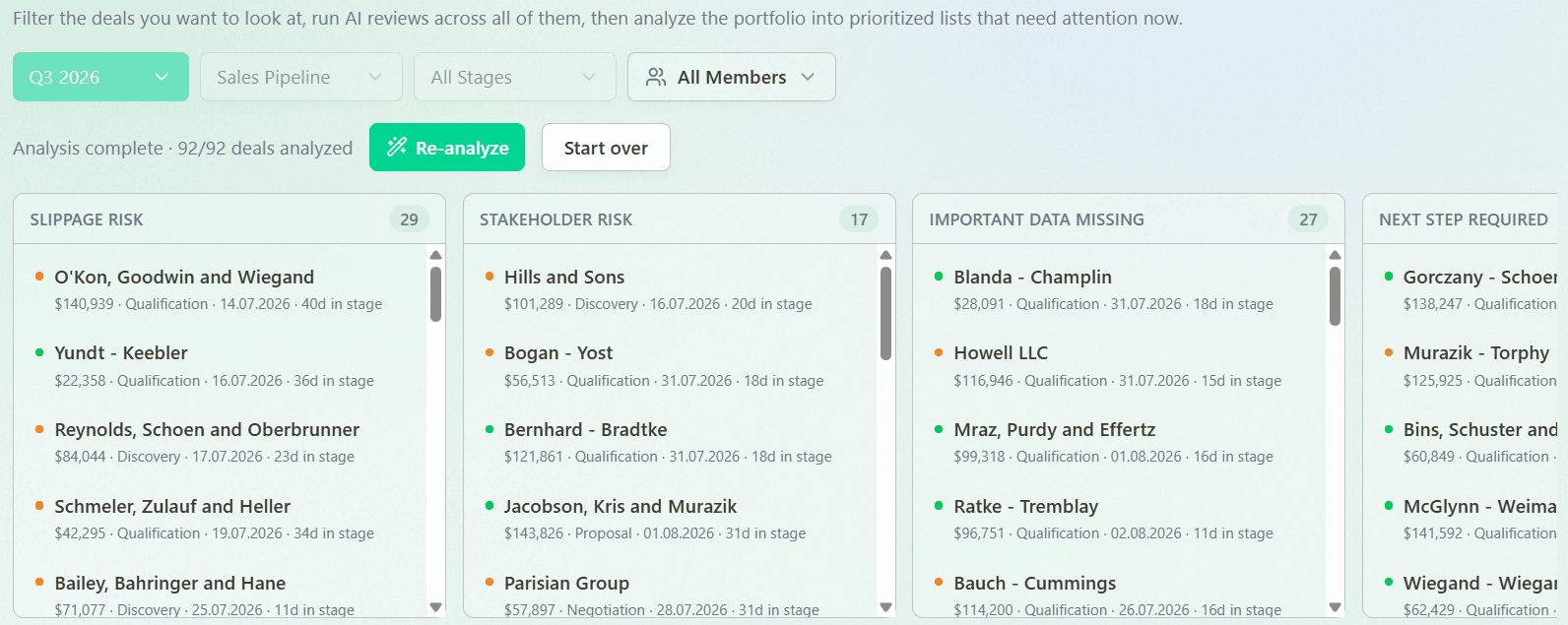
One of the most time-consuming parts of a sales pipeline review is deciding which opportunities deserve discussion. Reviewing every open deal rarely adds value, especially as the pipeline grows.
This process can be automated using CRM filters, saved views, dashboards, deal scoring models, or specialized revenue intelligence platforms. For example, you can automatically surface key deals based on opportunity value, expected close date, deal age, recent changes, strategic importance, pipeline stage, inactivity, or AI-generated scores. Some platforms also allow AI agents to rank opportunities by potential business impact, helping managers focus on the deals that matter most.
Instead of manually searching through the sales pipeline, every meeting starts with a prioritized list of opportunities that require attention.
Automated Deal Prioritization in Forecastio:
Automate Deal Analysis
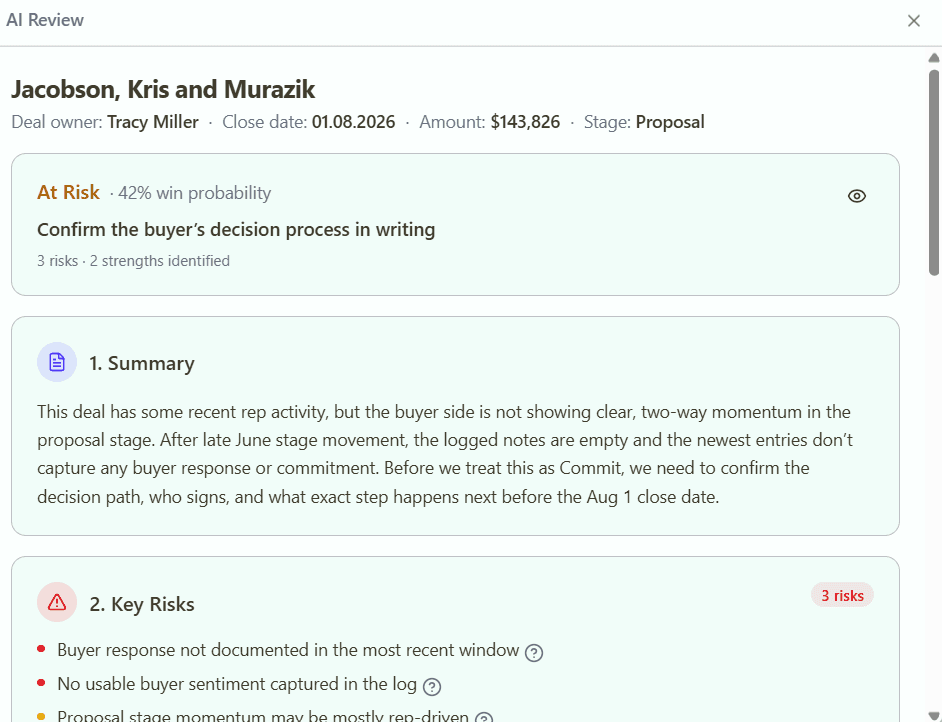
After selecting the right opportunities, managers still need to understand what is happening inside every deal. This often means reviewing CRM records, emails, meetings, notes, activities, and previous updates before the discussion even begins.
This analysis can be automated using AI agents or specialized revenue intelligence software. These solutions can generate deal summaries, identify risks and strengths automatically, detect buying signals, validate expected close dates, highlight missing stakeholders, explain recent changes, and recommend discussion points for every opportunity.
As a result, managers spend less time gathering information and more time discussing how to move deals forward.
AI Deal Review Agent in Forecastio:
Automate Pipeline Health Analysis
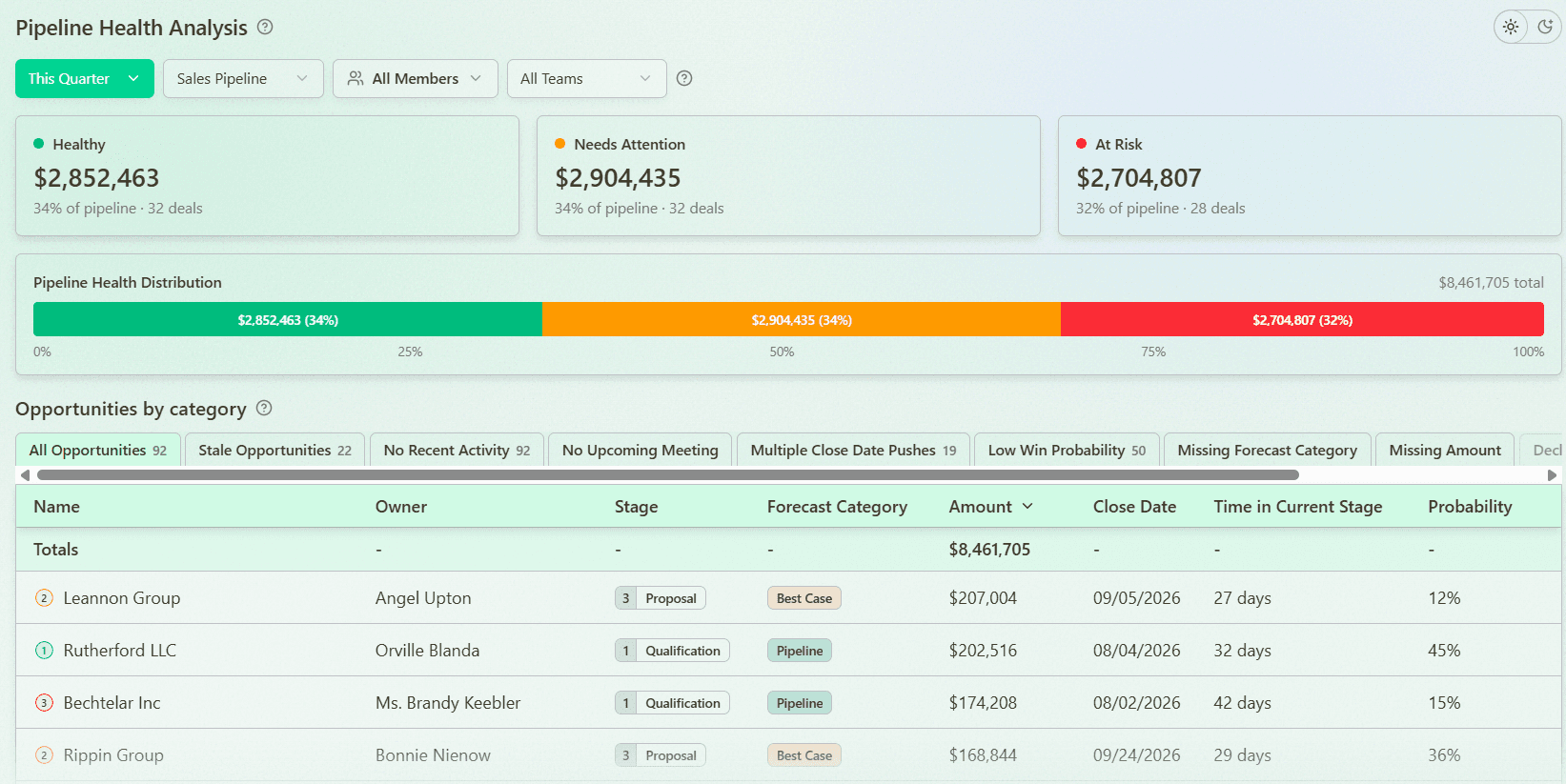
An effective pipeline review should evaluate not only individual opportunities but also the health of the entire pipeline. Preparing this analysis manually often requires reviewing multiple reports before every meeting.
CRM dashboards and revenue intelligence platforms can automatically monitor pipeline coverage ratio, stage distribution, conversion rates, pipeline trends, deal concentration, and other sales pipeline analysis metrics. Instead of manually preparing reports, managers receive an up-to-date view of overall pipeline health, making it easier to identify structural issues before they impact revenue.
Pipeline Health Analysis in Forecastio:
Automate Action Recommendations
One of the biggest challenges after identifying issues is deciding what should happen next. Recommendations often depend on the manager's experience, making the review process inconsistent across the organization.
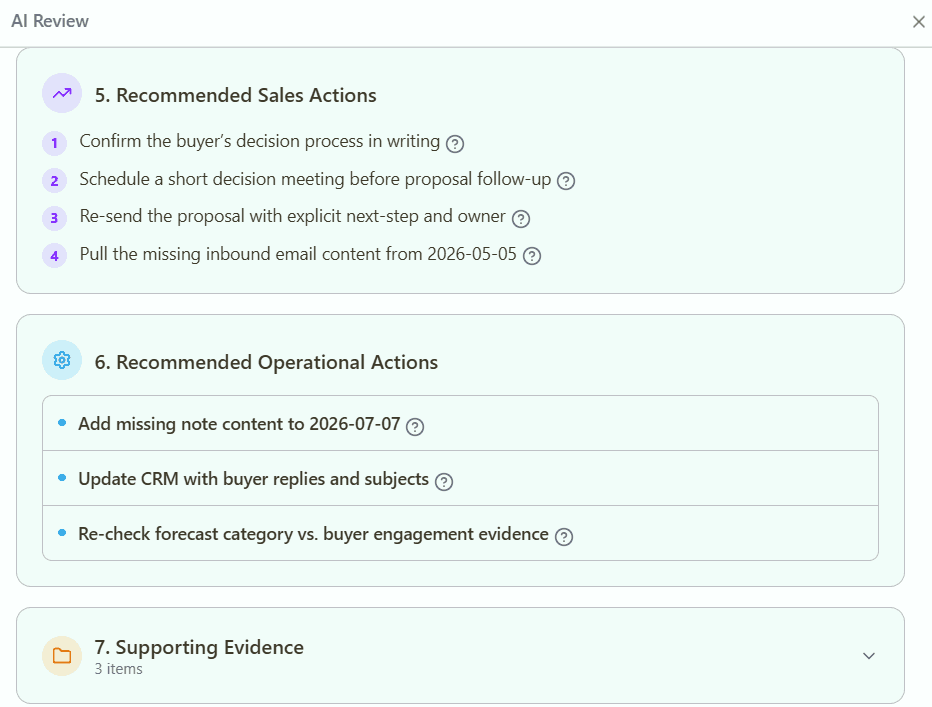
Modern AI agents can automatically recommend next steps based on the analysis of each opportunity. For example, they can suggest involving an executive sponsor, scheduling a customer meeting, updating the expected close date, changing the forecast category, improving stakeholder engagement, or creating follow-up tasks. These recommendations help sales managers coach more effectively while ensuring that every pipeline review meeting ends with a clear action plan.
AI Deal Review Agent in Forecastio:
Automate CRM Updates and Follow-up
A sales pipeline review creates value only when agreed actions are executed. Updating CRM records, assigning tasks, and following up manually is time-consuming and often inconsistent.
CRM workflows and AI agents can automate many of these operational activities. They can create follow-up tasks, notify deal owners, prepare CRM updates for approval, assign responsibilities, and track whether agreed actions have been completed before the next pipeline review. This improves CRM hygiene, increases accountability, and ensures that pipeline reviews result in measurable progress rather than repeating the same discussions every week.
What Software to Use to Automate Sales Pipeline Review Meetings
The right software depends on how much of the pipeline review process you want to automate. Standard CRMs, revenue intelligence platforms, and general AI assistants all play different roles. While CRMs help organize data and automate simple workflows, revenue intelligence platforms combine CRM data with AI to automate analysis, identify risks, recommend next steps, and streamline the entire review process. General AI tools can assist with analysis, but only after users manually provide the necessary data.
Capability | Standard CRM | Revenue Intelligence Platform | General AI (Claude, ChatGPT) |
|---|---|---|---|
Deal filtering and saved views | Yes | Yes | No |
Pipeline dashboards and reports | Yes | Yes (more advanced) | No |
Automatic deal summaries | Limited | Yes | Manual (after providing data) |
Deal Risk Analysis | Limited | Yes | Manual (after providing data) |
Pipeline health analysis | Basic | Yes | Manual (after providing data) |
Next step recommendations | Limited | Yes | Manual (after providing data) |
CRM workflows and task automation | Yes | Yes | Limited |
Sales forecasting and forecast analysis | Basic | Yes | No |
Ability to update CRM records | Yes | Yes | Limited |
For most companies, a standard CRM is sufficient to build reports, filter opportunities, and automate repetitive tasks. However, managers still need to review deals, interpret pipeline data, identify risks, and decide on the next actions manually.
Revenue intelligence platforms are designed to automate these analytical tasks. By combining CRM data and AI, they can prioritize deals, review opportunities, detect pipeline risks, generate recommendations, and automate selected follow-up actions. This significantly reduces the time required to prepare for and conduct sales pipeline review meetings.
General AI assistants such as Claude or ChatGPT can also help analyze sales data and generate recommendations. However, they typically do not have direct access to live CRM data or the ability to update CRM records. Users first need to export or copy the relevant information before AI can analyze it, making them better suited for ad hoc analysis than end-to-end pipeline review automation.
How Forecastio Automates Sales Pipeline Review Meetings
Forecastio combines pipeline intelligence, sales forecasting, and AI Revenue Agents to automate every stage of the sales pipeline review process. Instead of switching between CRM records, reports, and spreadsheets, sales leaders can review their pipeline from a single workspace.
Pipeline Intelligence provides real-time visibility into pipeline health through dashboards, waterfall reports, stage analysis, deal velocity, and risk indicators. Managers can quickly identify stalled opportunities, slipping deals, pipeline gaps, and other issues before the review meeting begins.
The AI Deal Review Agent automatically analyzes opportunities, prioritizes the deals that require attention, summarizes recent activity, identifies risks, and recommends next steps. It can also perform selected CRM updates and operational tasks with user approval, reducing the amount of manual work before and after pipeline review meetings.
Together, these capabilities help sales leaders spend less time preparing pipeline reviews and more time coaching their teams, reducing revenue risks, and improving forecast accuracy.
FAQ
Can sales pipeline reviews be automated completely?
No. While many preparation and analysis tasks can be automated, sales leaders still need to make strategic decisions, coach their teams, and agree on the next actions. Automation reduces manual work and surfaces insights, allowing meetings to focus on decision-making rather than gathering information.
How often should sales pipeline review meetings be held?
Most sales teams hold pipeline review meetings weekly. Teams with long sales cycles may review their pipeline every two weeks, while high-volume sales organizations often conduct shorter reviews several times a week.
What should be discussed during a sales pipeline review?
A pipeline review typically covers high-value opportunities, stalled deals, pipeline coverage, deal progression, forecast accuracy, sales risks, and the next actions required to move opportunities forward.
How can AI improve sales pipeline review meetings?
AI can automatically analyze opportunities, summarize deal activity, identify risks, prioritize the most important deals, recommend next steps, and automate follow-up tasks. This reduces preparation time and helps sales managers focus on coaching and decision-making instead of manual analysis.
What is the best software for sales pipeline review meetings?
The best solution depends on your needs. Standard CRMs provide dashboards, reports, and workflow automation, while revenue intelligence platforms add AI-powered deal analysis, pipeline health monitoring, forecasting, and automation. General AI tools can assist with analysis but typically require users to manually provide CRM data.
What is the difference between a pipeline review and a forecast review?
A pipeline review focuses on the health and quality of sales opportunities, helping managers identify risks and improve deal execution. A forecast review focuses on predicting future revenue by evaluating expected deal outcomes and the likelihood of achieving sales targets.
Share: